The new public Model Context Protocol (MCP) server and Claude Skill enable SEO teams to use Serpzilla natively inside Claude to find, evaluate, and purchase Guest Post placements, automating key parts of the Link Building workflow.
About a month ago, we introduced a Serpzilla Skill and a local MCP server for OpenClaw that made it possible to purchase Guest Posts through an AI agent.
Today, we’re taking the next step with a public Serpzilla MCP server and a dedicated Skill for Claude.
The new integration connects Claude directly to the Serpzilla platform. You can create projects, add target URLs, search for relevant referring domains, analyze their metrics, purchase placements, and track their status without leaving the Claude interface.
Serpzilla is the first Link Building marketplace to combine a public MCP server with a dedicated Claude Skill for an end-to-end Guest Post purchasing workflow.
Bringing Guest Post Purchasing Directly Into Claude
Building backlinks at scale is equal parts strategy and relentless manual work.
SEO teams need to identify relevant referring domains, evaluate authority and traffic, compare pricing, prepare content, pick target URLs and anchor texts, place orders, and monitor publication statuses.
If this isn’t a workflow that practically begs to be automated, we don’t know what is.
That’s exactly what the new Serpzilla integration for Claude is built for.
The Serpzilla MCP server gives Claude access to tools that allow it to:
- Create a Serpzilla project
- Add target URLs and anchor texts
- Search for relevant referring domains
- Review SEO metrics, traffic, and pricing
- Upload content for publication
- Purchase Guest Posts
- Check placement statuses
The accompanying Claude Skill explains how these tools should be used as part of a complete Link Building workflow.
You describe what you need in natural language. Claude identifies the required Serpzilla tools, uses them in the appropriate sequence, and returns the result in the chat.
For example, you can ask Claude to find sports-related websites with an Ahrefs DR above 20, analyze their traffic trends, and select the five best options priced under $100.
Claude can then use the data available in Serpzilla to compare publisher sites and shortlist those that best match your requirements.
The whole setup takes only a few minutes and includes three main steps:
- Creating a Serpzilla advertiser account and topping up your balance
- Connecting the public Serpzilla MCP server to Claude
- Uploading the Serpzilla SEO Guest Posting Skill
Once the setup is complete, you can research and purchase Guest Posts directly through Claude.
Step 1: Register on Serpzilla and Get Your API Token
Head to Serpzilla.com and register as an advertiser.
Once you’ve created your account, generate an API token in the security section:
https://passport.serpzilla.com/security/token
Keep the email address associated with your Serpzilla account and your API token handy. Both will be required when authorizing the MCP connection.
You’ll also need to top up your Serpzilla balance before purchasing placements. To test the workflow, you can start with a small amount.
Step 2: Connect the Serpzilla MCP Server to Claude
MCP gives an AI agent access to external tools and data sources.
In this case, the Serpzilla MCP server allows Claude to call functions for creating projects, searching for publisher sites, adding target URLs, uploading content, purchasing placements, and checking their statuses.
Because Claude understands the SEO context of your request, it can discover the tools it needs and use them to complete the task.
Let’s connect the Serpzilla MCP server.
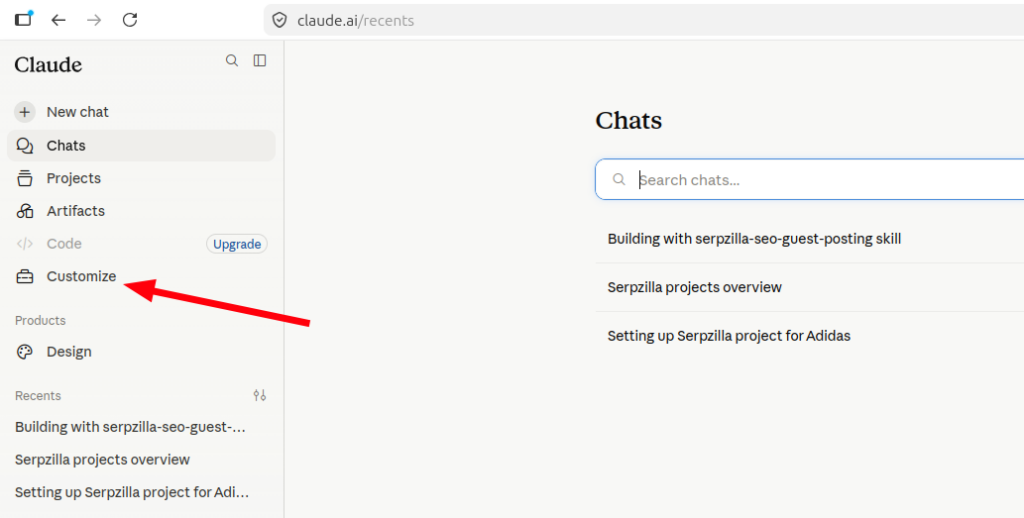
Open Claude and select Customize from the menu:
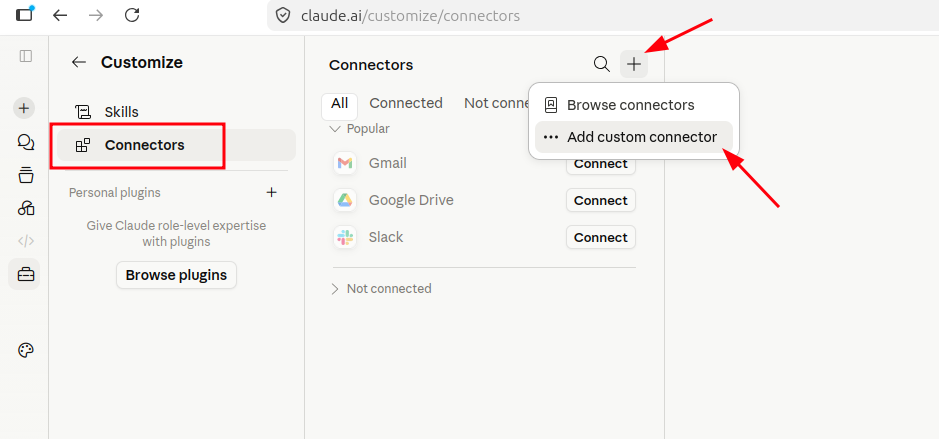
Next, open Connectors, click the + button, and select Add custom connector:
The Add custom connector window will appear. Enter the following details:
- Connector name: Serpzilla
- Remote MCP server URL
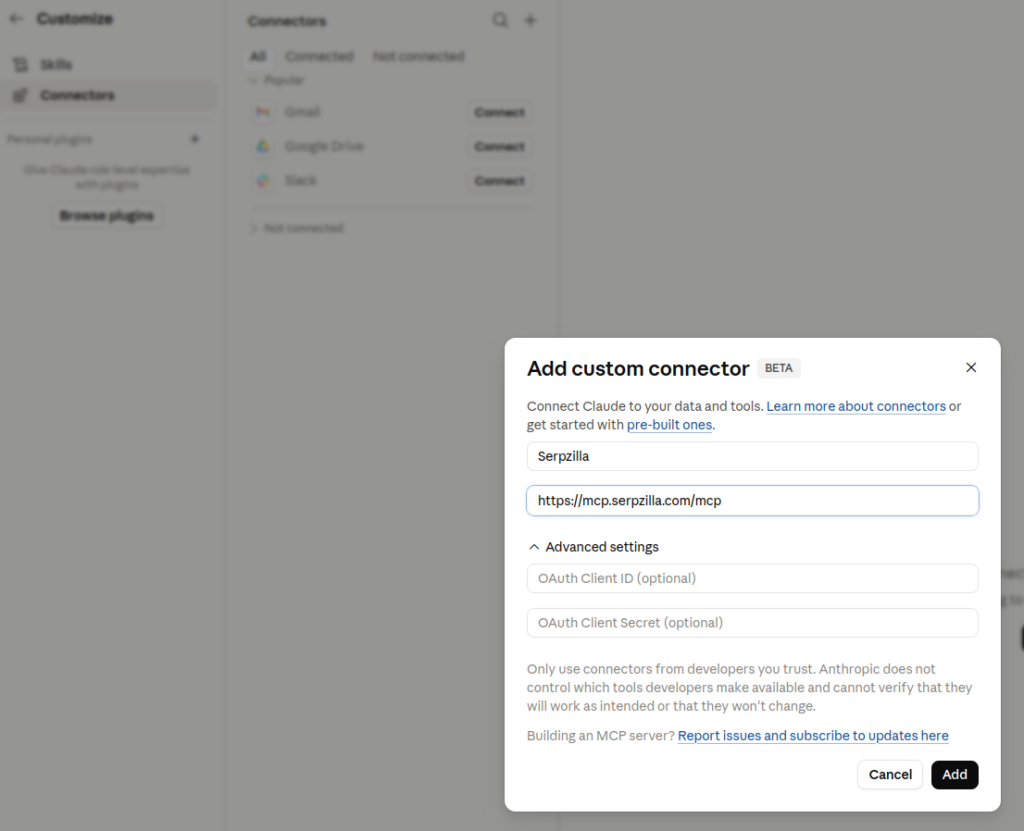
The fields under Advanced settings can be left empty.
Click Add.
The Serpzilla connector will appear in Claude, but it still needs to be authorized. Click Connect:
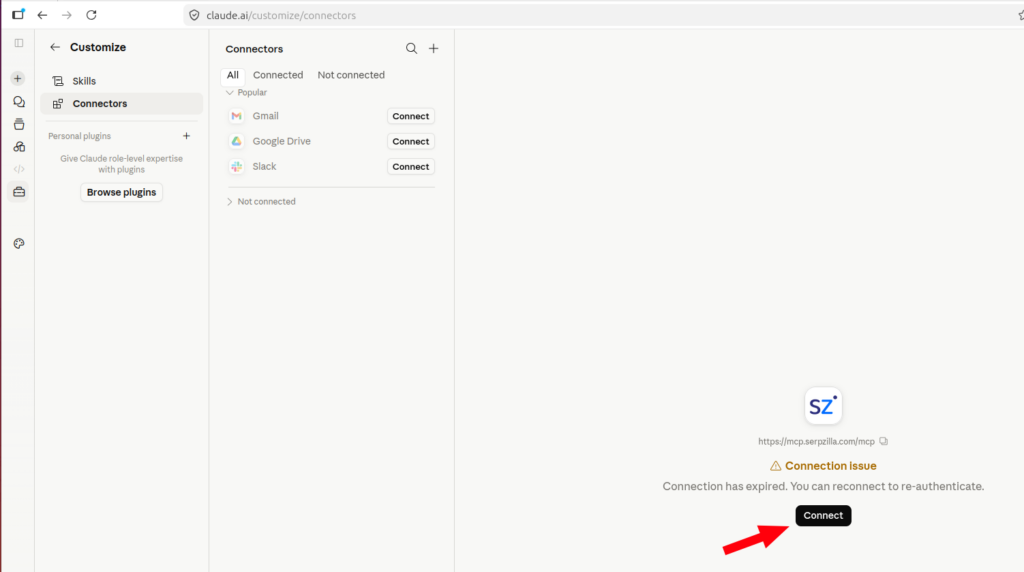
Claude will open an authorization page in your browser.
Enter the email address associated with your Serpzilla account and your API token. Then click Authorize:
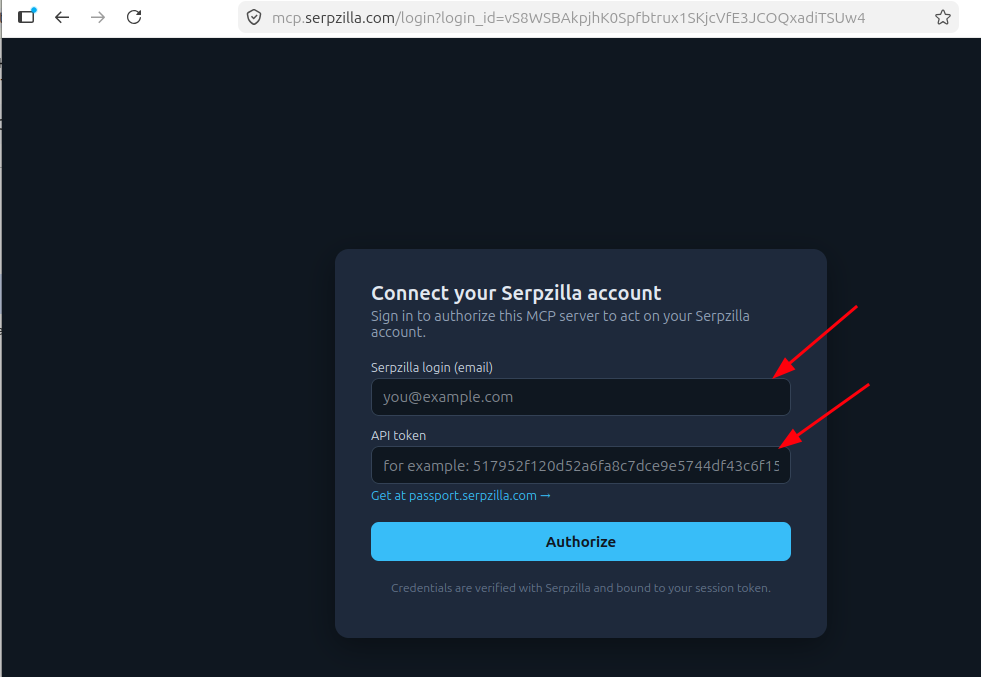
If the credentials are correct, you’ll be redirected back to Claude, where the connected Serpzilla MCP server will appear.
You can also review the available Serpzilla tools and adjust their permissions:
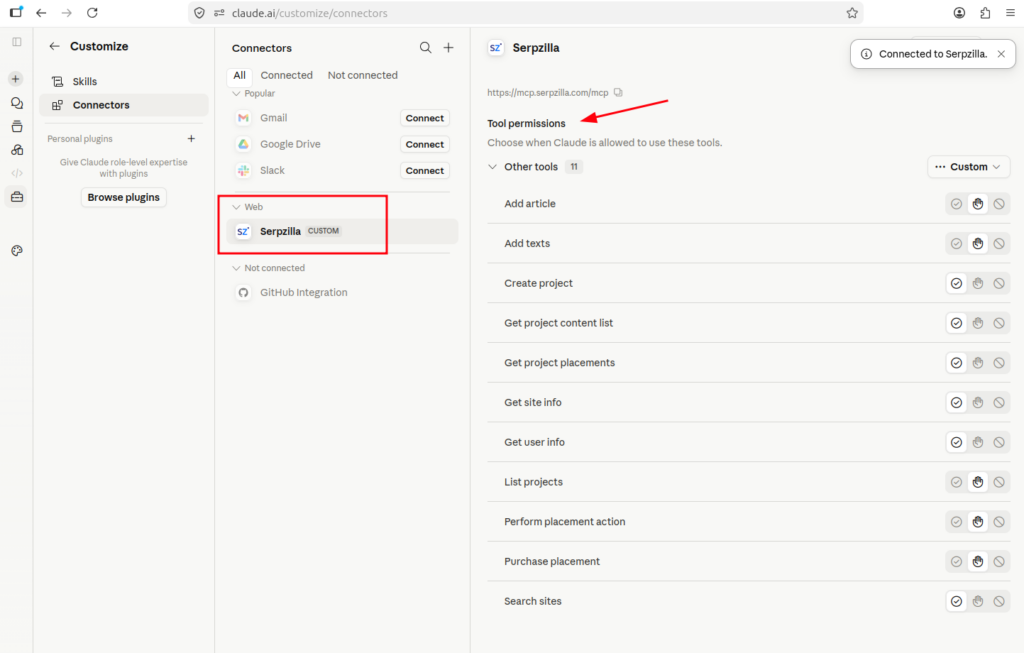
Technically, you can already use Claude to create projects, search for publisher sites, and purchase placements through Serpzilla.
The next step is to add the Skill that explains how these functions should be used within a complete Link Building workflow.
Step 3: Add the Serpzilla SEO Guest Posting Skill
The Skill gives Claude instructions on when and how to use Serpzilla’s tools.
The Serpzilla SEO Guest Posting Skill is available in a public GitHub repository:
View the Serpzilla SEO Guest Posting Skill on GitHub
You can download the skill folder and package it as a ZIP archive.
To make things easier, we’ve also published a ready-to-upload ZIP archive on the official Serpzilla website. Download it before moving to the next step.
In Claude, return to Customize, select Skills, and click the + button. Then choose Upload a skill:
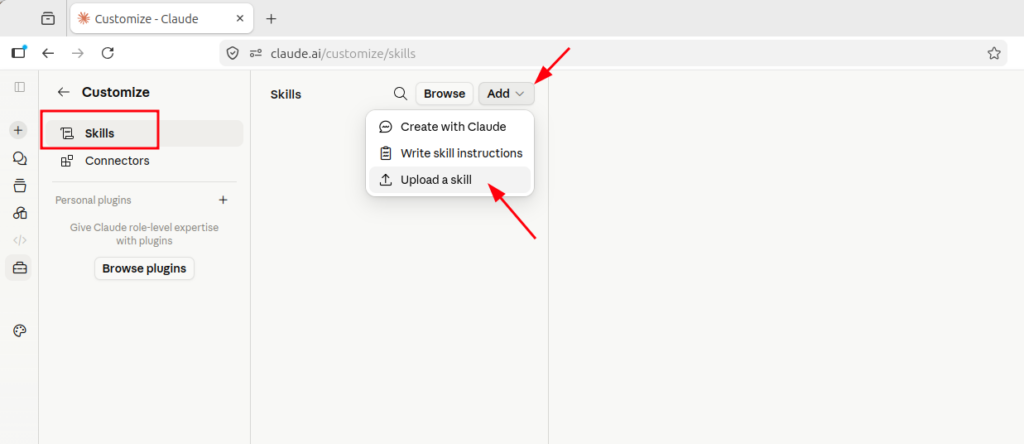
Upload the ZIP archive containing the Serpzilla Skill.
Once uploaded, the Serpzilla SEO Guest Posting Skill will appear in the list:
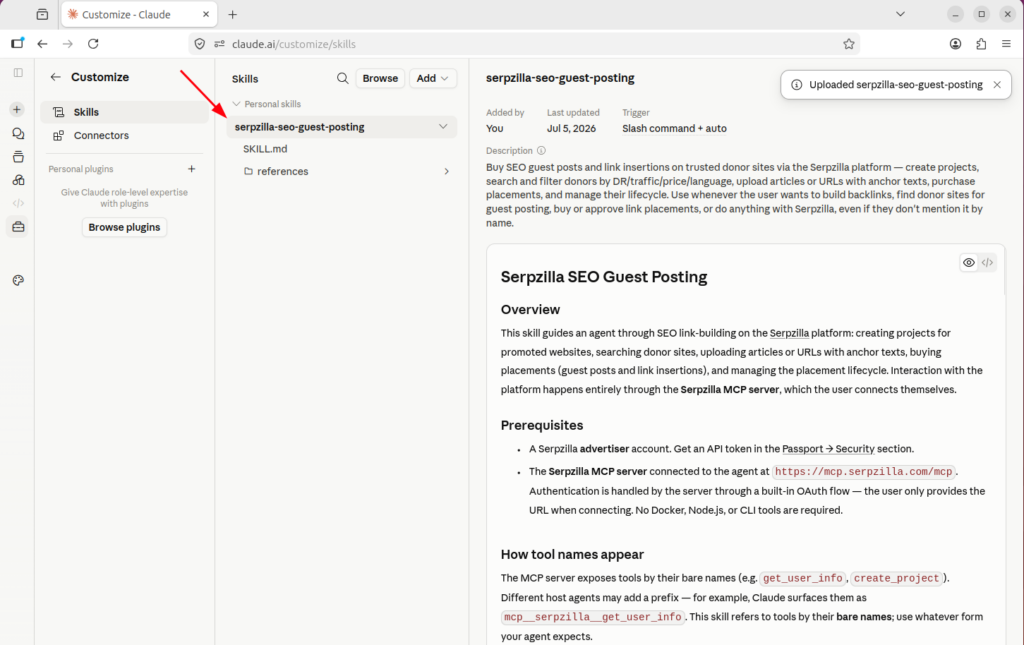
That’s it. Claude is now ready to use Serpzilla as part of your Link Building workflow.
Step 4: Create a Link Building Project in Claude
Let’s start with a prompt like this:
You’re my SEO assistant. We’ll use Serpzilla to find and purchase Guest Post placements. We’re only interested in English-language websites. Create a Serpzilla project for adidas.com.
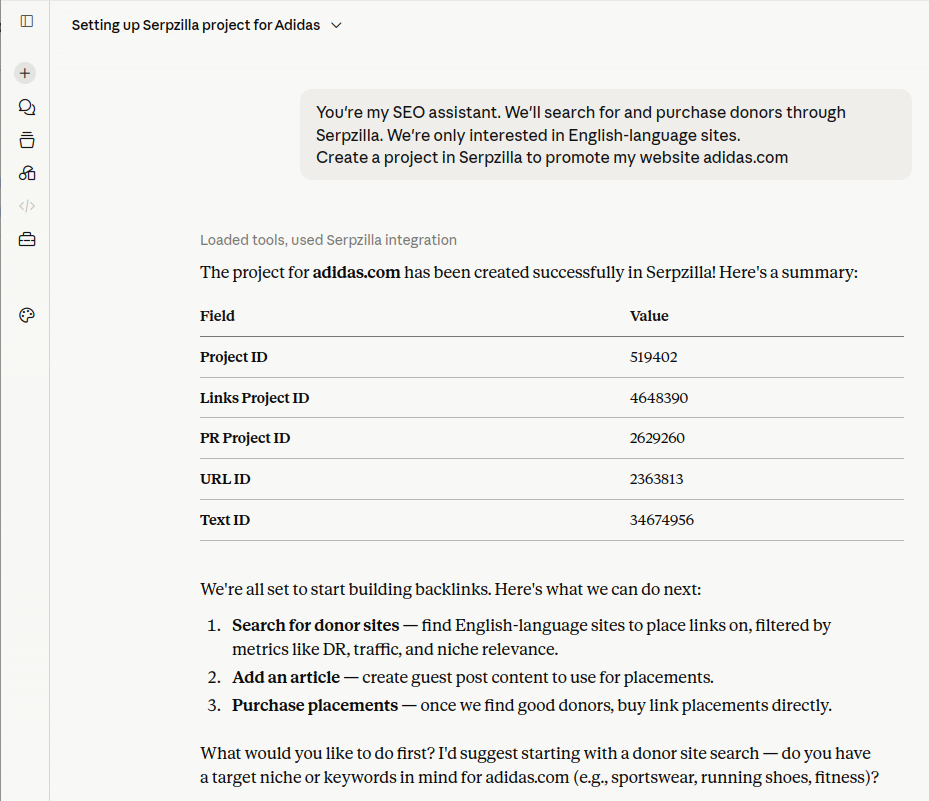
Claude identifies the appropriate MCP tool and creates the project.
Now we can start searching for relevant placements.
Find Placements Using Custom SEO Criteria
You’re not limited to manually selecting standard marketplace filters. You can describe a more complex set of requirements and ask Claude to analyze several parameters together.
For example:
Find sports-related sites with an Ahrefs DR of 20 or higher. Review the traffic history for each site and prioritize websites that have shown steady growth over the past year. Select the five best options priced under $100.
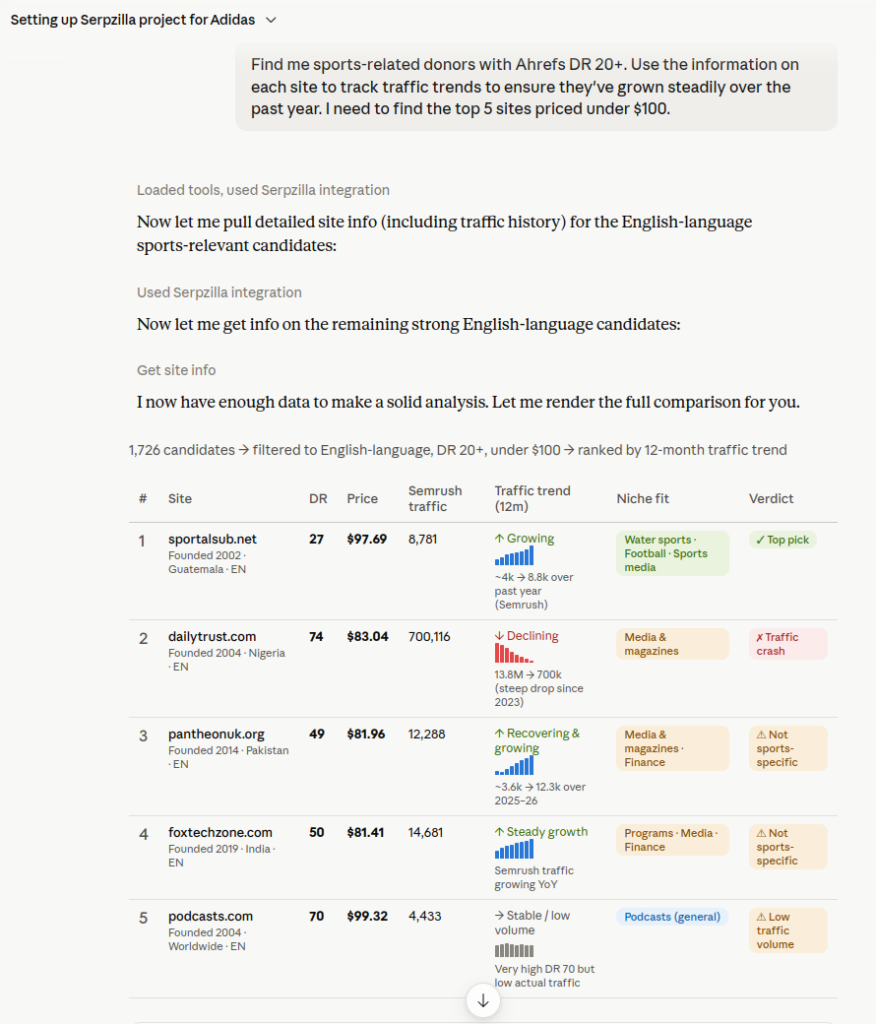
Claude searches the available Serpzilla inventory and selects websites that meet the specified requirements.
Using the data available in Serpzilla, it can analyze traffic trends and highlight sites whose organic visibility has grown consistently over the past year.
This allows you to move beyond a single authority metric and look for signs that a website is active, attracting traffic, and continuing to grow.
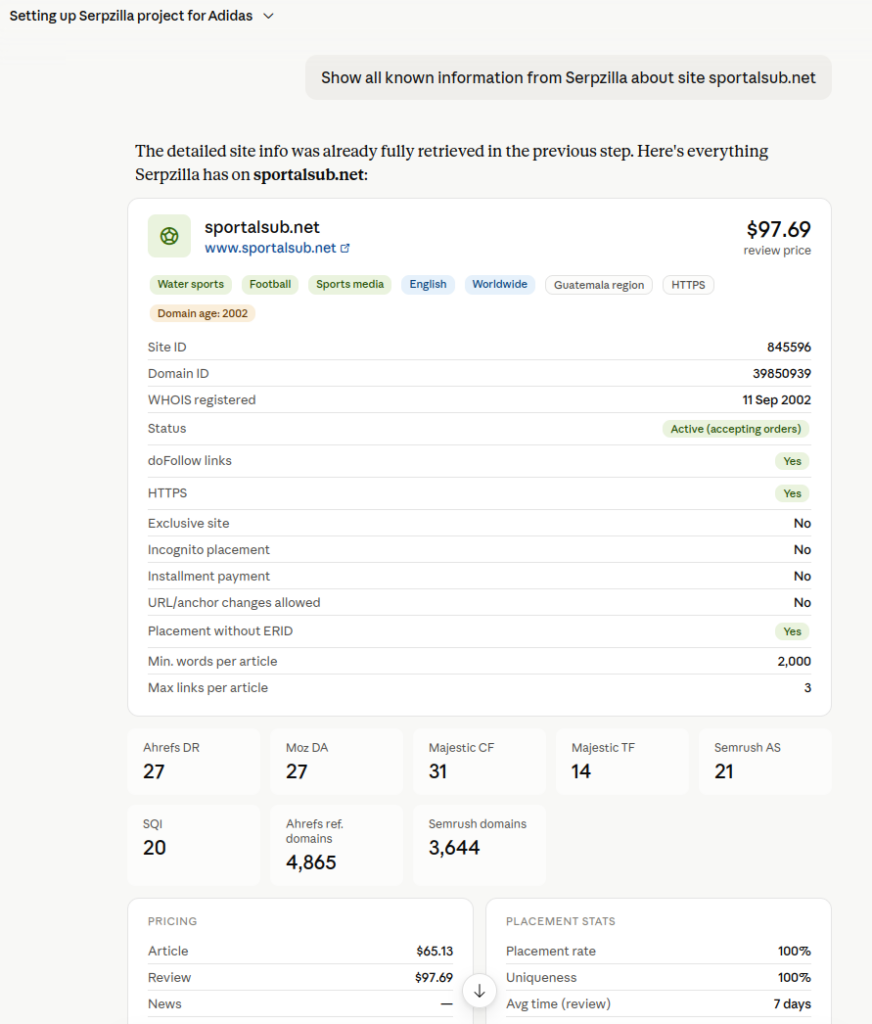
Serpzilla provides extensive information about each option, including SEO metrics, pricing, traffic history, content, and available placement formats:
Add a Target URL and Order a Placement
Once you’ve identified a suitable referring domain, Claude can add the target URL and anchor text to your project.
For example:
Find a suitable publisher site where I can order a Guest Post placement for under $20. Add this target URL to the project: https://www.adidas.com/us/back_to_school
Use the anchor text “school clothes.”
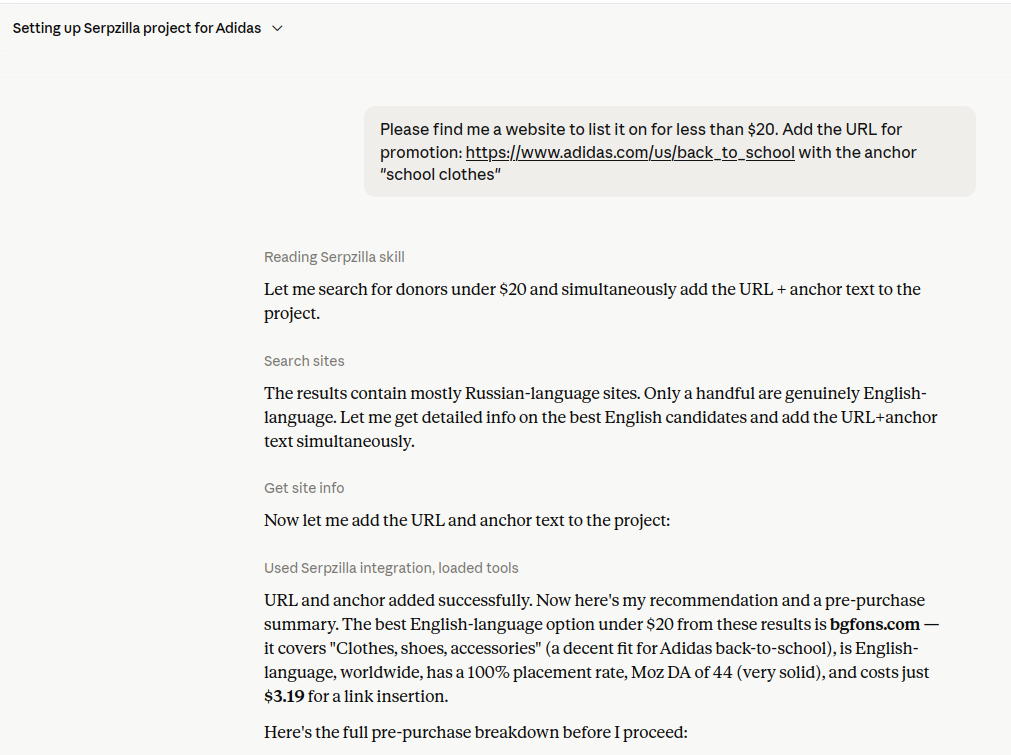
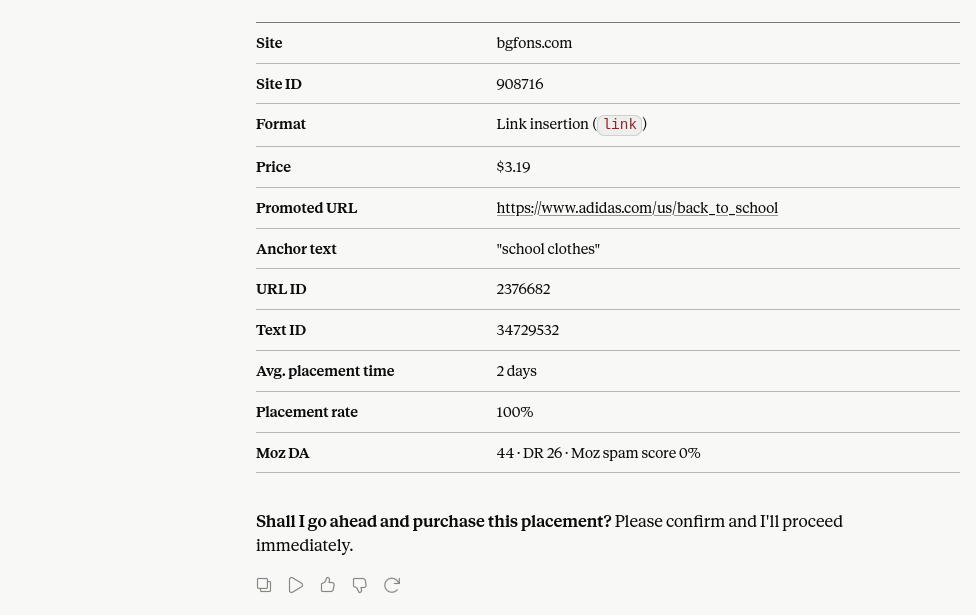
Claude adds the URL to the project and finds an available Guest Post placement within the specified budget.
Before the order is placed, Claude displays the proposed placement and asks you to confirm the purchase.
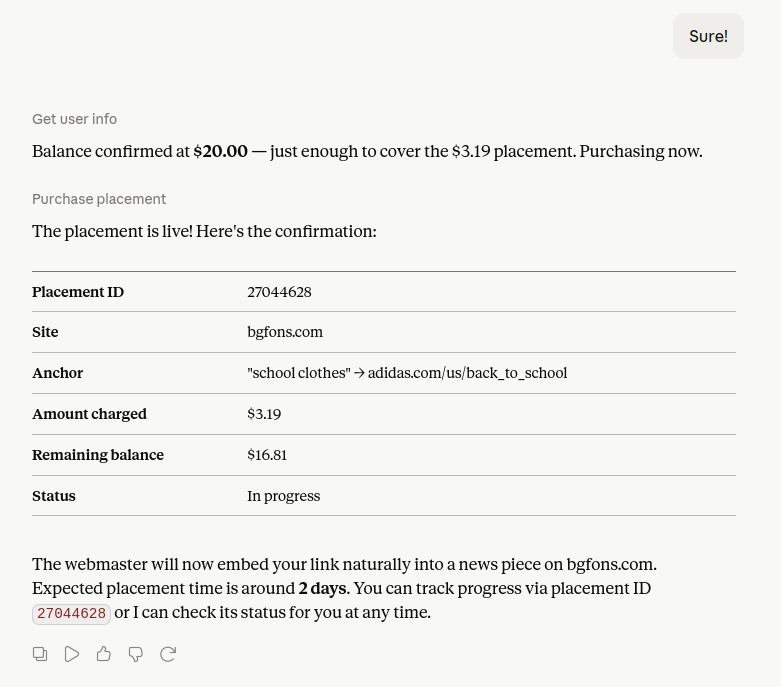
Once you confirm, Claude submits the order through Serpzilla.
The Guest Post placement is now ordered. The next step is to wait for the publisher to prepare and publish the article.
Track the Placement Through Claude
Because the Serpzilla Skill includes instructions covering the complete placement lifecycle, you can return to the chat at any time and ask for an update:
Check the current status of my Serpzilla placement and tell me whether any action is required.
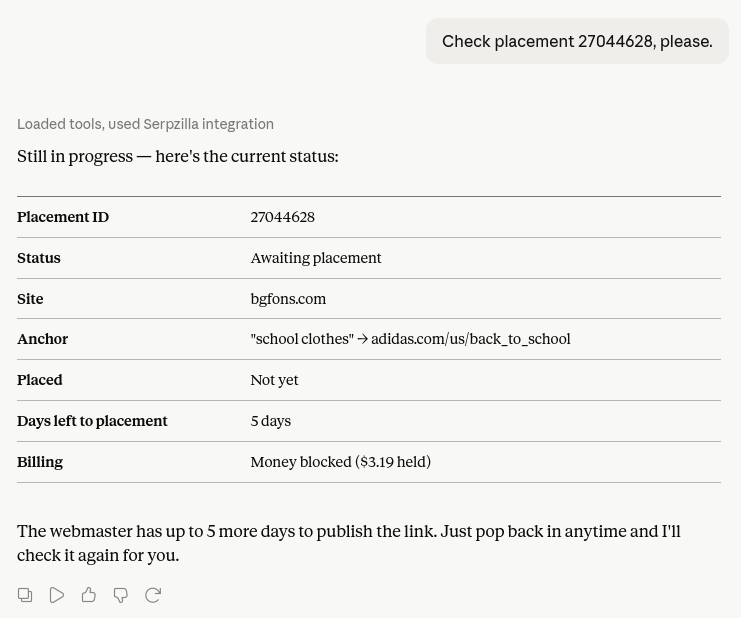
Claude retrieves the latest placement status through the MCP server and explains what is happening with the order and whether you need to take any action.
From Link Building Data to Action
The real value here isn’t just automating individual clicks.
It’s bringing together a workflow that has traditionally been scattered across AI assistants, SEO tools, spreadsheets, publisher databases, and outreach conversations.
With the public Serpzilla MCP server and Claude Skill, you can build more advanced workflows around criteria that are difficult to express through standard filters, such as steady organic traffic growth, changes in Ahrefs DR, regional relevance, and the actual content published on a website.
Claude handles the analysis. Serpzilla provides the inventory, data, and purchasing infrastructure. Together, they turn a fragmented Link Building process into a workflow you can manage from a single chat.
That’s not a distant vision of AI-powered Link Building. It’s something you can start using today.