If you’ve spent any time in SEO, you know that building backlinks at scale is equal parts strategy and a pretty horrendous tedium. You research potential placements, evaluate metrics, write or commission content, upload it, track placements, you do a crazy amount of outreach — and then do it all over again for the next URL, rinse, repeat.
If this isn’t a workflow that practically begs to be automated, we don’t know what is.
That’s exactly what the Serpzilla SEO Guest Posting Skill for OpenClaw is built for. It connects your AI agent directly to Serpzilla’s link-building platform via an MCP server, giving you a clean set of tools to search potential link placement sites, upload articles, buy placements, and manage their full lifecycle, all from within your agent’s chat interface, without ever touching a browser.
Did that get you interested? Here’s how to get it running. Oh, and we give it away for free!
Download the skill here and the detailed instruction on how to use it is below.
How Our Trial Setup Looks
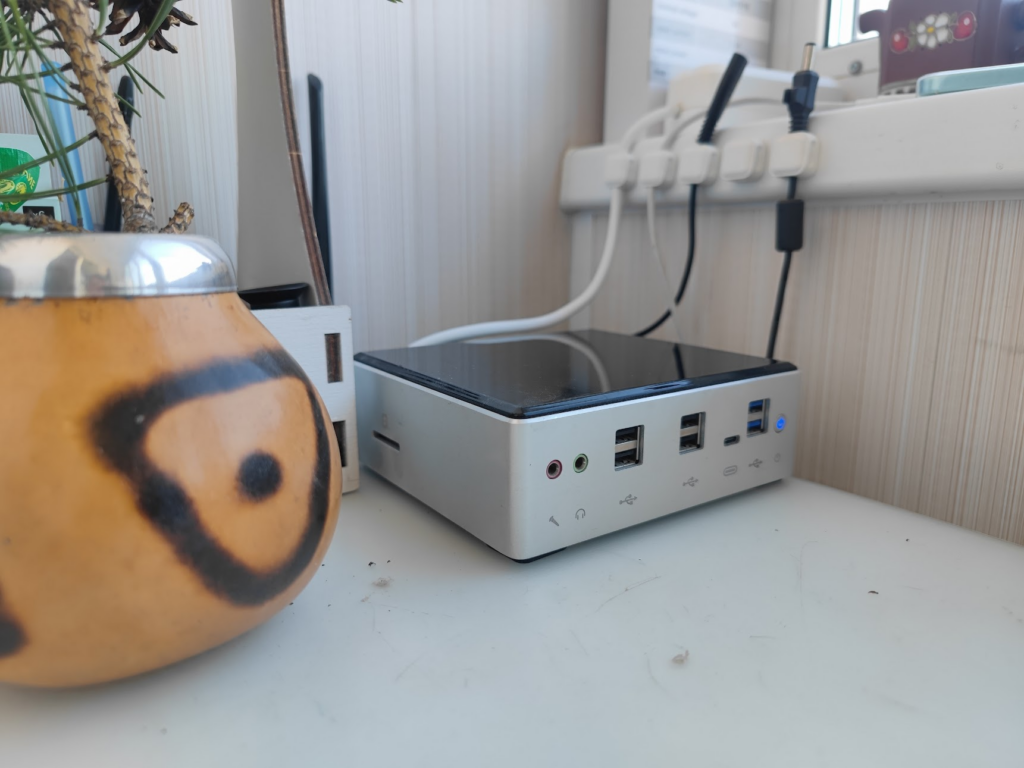
The OpenClaw agent we tested runs on a mini-PC that used to pull duty as a work machine. It’s reasonably well-specced — an 8-core i7-10510U, 32 GB RAM — though honestly, you don’t need anywhere near that. We’ve run the same setup on a Raspberry Pi 5 without issues.
All our machines have names (don’t judge). This one is Veniamin, and he lives on the humble author of this article’s balcony.
What You’ll Need Before Starting
No surprises here, the usual suspects:
- Docker — runs the Serpzilla MCP server in an isolated container
- Node.js and npm — for installing and running mcporter
- OpenClaw — your agent runtime
- A Serpzilla advertiser account with a funded balance
If you’re missing any of these, sort them out first. The skill won’t do much without them.
Step 1: Register on Serpzilla and Get Your API Token
Head to Serpzilla.com and register as an advertiser. Once you’re in, grab your API token from the security section:
https://passport.serpzilla.com/security/token/
Keep your login email and this token handy — you’ll need both for the MCP server configuration.
Step 2: Install mcporter and Register the MCP Server
mcporter is the CLI tool that lets OpenClaw talk to external MCP servers. Install it globally:
npm install -g mcporterNow you just need to enable it in the web UI.
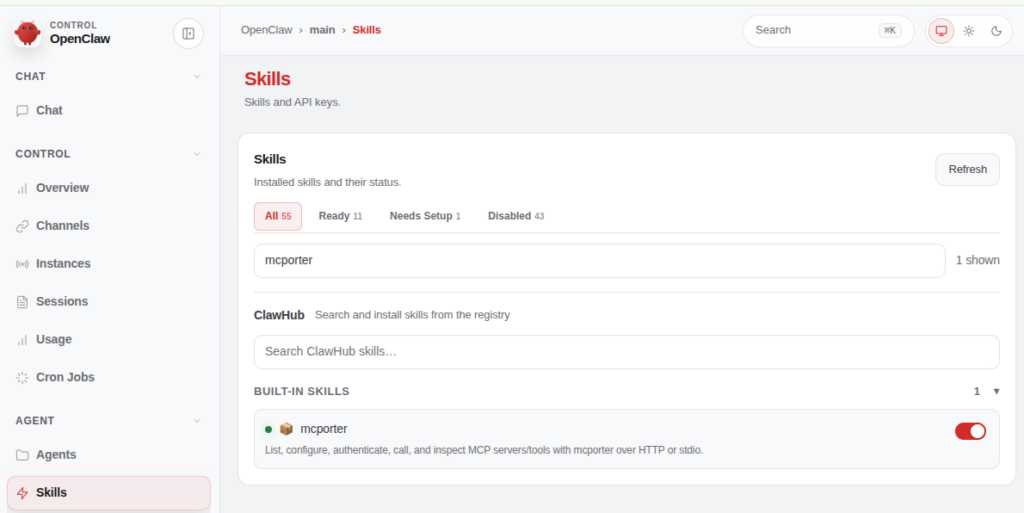
Then register the Serpzilla MCP server. Replace XXX with your login email and YYY with your API token:
npx mcporter config add serpzilla \
--stdio "docker run -i --rm \
--env SERPZILLA_LOGIN=XXX \
--env SERPZILLA_API_TOKEN=YYY \
stanislavusbest/serpzilla-mcp-stdio-server:v1.0.7"
To confirm everything is wired up correctly:
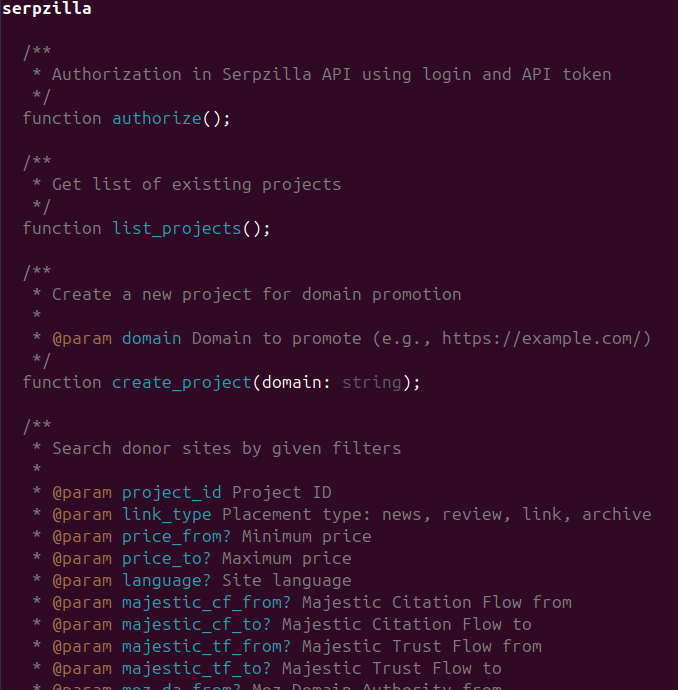
npx mcporter list serpzilla You should see a list of available Serpzilla tools. If you do, you’re good to move on.
Step 3: Install the Skill in OpenClaw
openclaw skills install serpzilla-seo-guest-posting
openclaw gateway restart
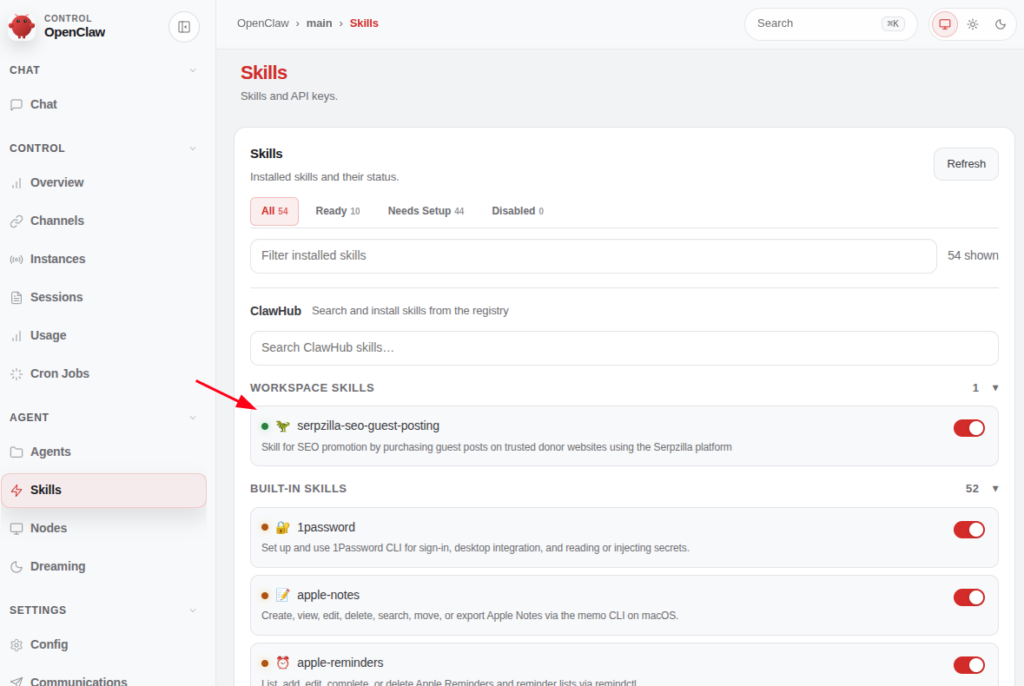
After the restart, the /serpzilla_seo_guest_posting command will be available in the Web UI, and the skill will appear in your skills list. That’s your entry point for everything that follows.
The Core Workflow: From Project to Placement
Serpzilla organizes everything around a few key entities: Projects, URLs, Articles, Texts, and Placements. Think of a Project as a container tied to a domain. Inside it live the URLs you’re promoting, the articles you’re placing, the anchor texts you’re using, and the placements themselves.
Create a Project
npx mcporter call serpzilla.create_project domain=YOUR_SITE.COMSave the PROJECT_ID from the response because you’ll be passing it into basically every subsequent call.
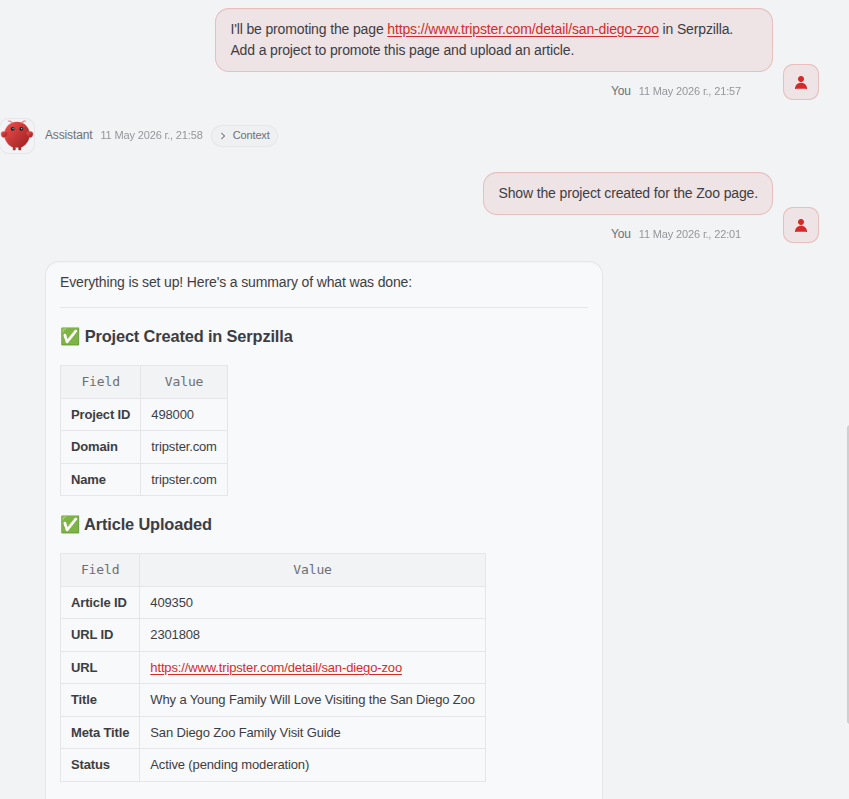
When a project is created, Serpzilla automatically generates a default URL (your domain) and a default anchor text (the domain name). You can add more specific landing pages and anchors later.
For example, this is the result of using the skill to create a project for our test site:
Upload Your Article (for news format placements)
If you’re doing guest posts where you supply the content (the news format), you need to upload your article before purchasing. The body should be HTML with your backlinks already embedded:
npx mcporter call serpzilla.add_article \
  project_id=PROJECT_ID \
  url='https://yoursite.com/target-page' \
  title='Internal Title' \
  meta_title="Meta Title for Publisher" \
  body='<p>Your HTML article content with <a href="https://yoursite.com">anchor text</a>.</p>'
Articles go through moderation — typically 1–2 business days. Check status with:
npx mcporter call serpzilla.get_project_content_list project_id=PROJECT_ID
You can only use articles with approved status in purchases. For review, link, and archive formats, no article upload is needed, the webmaster handles content creation.
Find Referring Domains
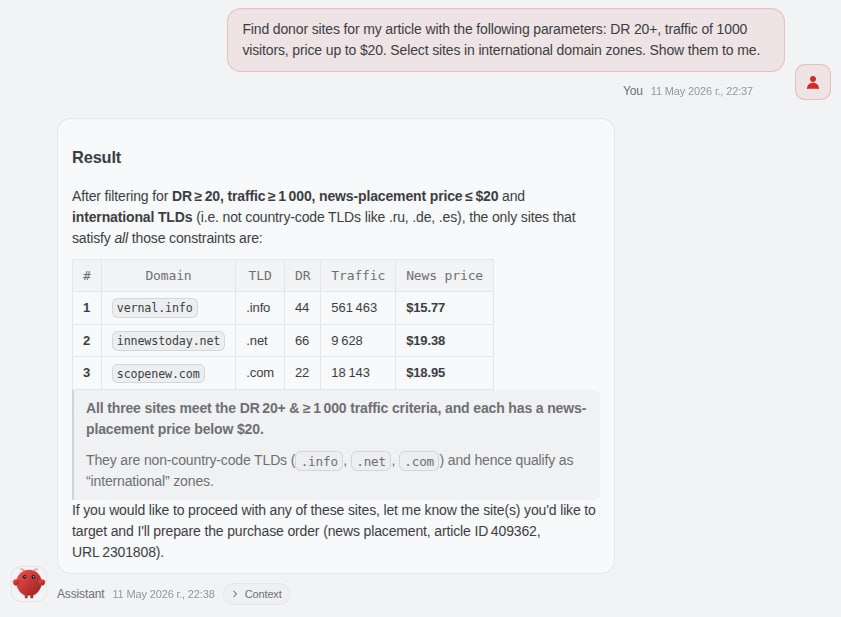
With your project set up, search for available placement sites:
npx mcporter call serpzilla.search_sites project_id=PROJECT_ID link_type=linkValid link_type values: news, review, link, archive. Each represents a different placement format:
| Format | Who Writes the Content | Notes |
news | You (the advertiser) | Full guest post, your article |
review | The publisher | Full guest post, publisher’s article |
link | The publisher | Your link inserted into a news piece |
archive | The publisher | Link placed in an existing article |
To dig into a specific site’s metrics such as DR, traffic, pricing, placement examples:
npx mcporter call serpzilla.get_site_info site_id=SITE_ID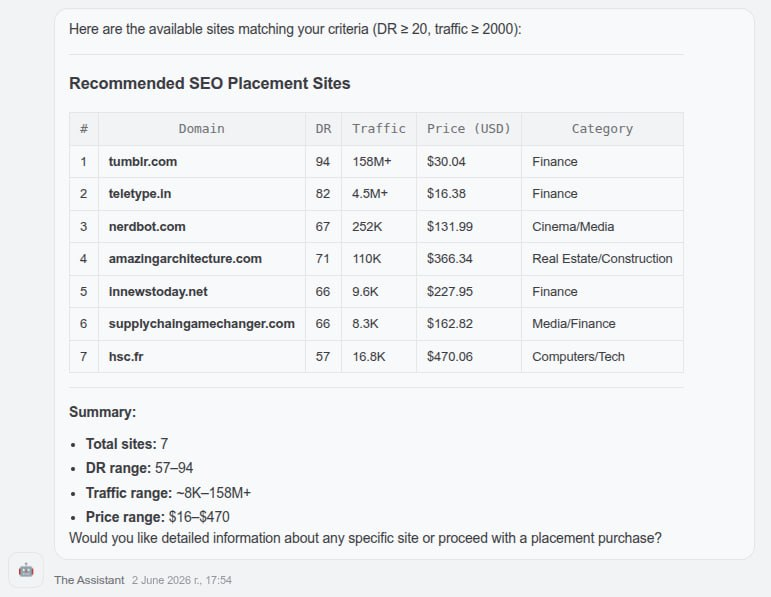
Buy a Placement
Before the agent pulls the trigger on any purchase, it will check your account balance, show you the site URL and price, calculate your remaining balance post-purchase, and ask for your explicit confirmation. No stealth spending.
Once confirmed, the purchase call looks like this (example for news format):
npx mcporter call serpzilla.purchase_placement \
  project_id=PROJECT_ID \
  link_type=news \
  site_id=SITE_ID \
  article_id=ARTICLE_ID \
  url_id=URL_ID \
  search_history_id=""
Note: search_history_id must always be an empty string “” and you don’t want to skip it.
For review, link, and archive formats, swap article_id for text_id:
npx mcporter call serpzilla.purchase_placement \
  project_id=PROJECT_ID \
  link_type=link \
  site_id=SITE_ID \
  url_id=URL_ID \
  text_id=TEXT_ID \
  search_history_id="
Optional but useful for news: add is_content_need_approval=true if you want to review the publisher’s context before they go live. Good for high-stakes placements.
Step 5: Managing Placements After Purchase
Placements have a lifecycle and their statuses transition as the publisher works, content gets reviewed, and links go live. The skill handles all of it through a single action tool:
npx mcporter call serpzilla.perform_placement_action \
  placement_ids=PLACEMENT_ID \
  action=ACTION_NAME
Key actions and their financial implications:
approve_seo / approve_content_seo— releases funds to the publishercancel_seo/cancel_from_*— may trigger refunds or forfeiture depending on the stageterminate_seo— permanently removes an approved backlinkapprove_from_arbitration_seo— resolves a dispute in your favor
Same deal as purchases: the agent will inform you of the financial impact and ask for confirmation before executing any action.
To check on your placements:
npx mcporter call serpzilla.get_project_placements project_id=PROJECT_ID
A Note on Balance
To check your current account balance at any time:
npx mcporter call serpzilla.get_user_infoTo top up, visit: https://passport.serpzilla.com/deposit/
The Bigger Picture
The real value here isn’t just automating individual steps, rather it’s closing the loop on a workflow that’s traditionally fragmented across multiple tools and dashboards.
With this skill and an AI agent that can also generate content, run site analysis, and track rankings, you’re looking at a genuinely end-to-end SEO automation setup. Your agent finds opportunities, writes the content, places it, and monitors the outcome.
That’s not a distant possibility. With OpenClaw, Serpzilla, and the right skills configured, it’s where you can be today.