Every SEO specialist knows that backlinks are a crucial part of a site’s promotion strategy. But a common question is: how long does it take for backlinks to work? The answer depends on many factors, and here we’ll look at key aspects to consider.
TL;DR
- Most backlinks show first signals in 2–6 weeks, noticeable impact in 2–4 months
- The effect depends on indexing speed, authority, competition, and your existing link profile
- Strong links compound over time; the biggest gains often appear months after the first movement
Why You Can’t Predict the Exact Day Backlinks Will Take Effect
“How long do backlinks take to work?” is not such a straightforward question to answer. Backlinks don’t work like, for example, paid ads, where Google instantly rewards you.
When a link goes live, the process looks more like this:
- Google crawls the linking page.
- The link gets discovered and processed.
- Signals are recalculated.
- Your page competes again inside the ranking system.
Each of those stages happens on different timelines.
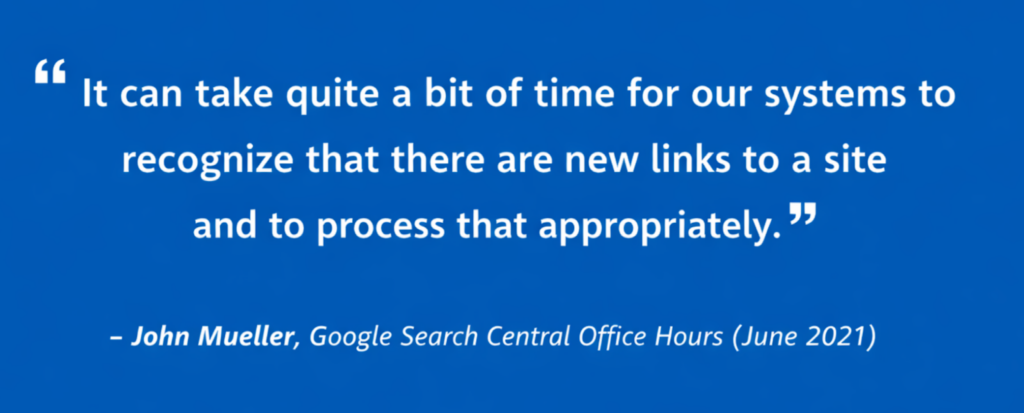
Google representatives have repeatedly explained that algorithms reassess signals continuously. There is no public link refresh date. Rankings update when Google processes enough data to justify movement.
Bottom line: Rankings are relative + if your competitors are also building links, the timeline stretches.
The 4 Stages of Backlink Impact
A backlink has to pass through four separate stages before you can expect visible SEO results:
| Stage | What happens | SEO impact |
| 1. The link is published. | Your backlink appears on the donor page. | Nothing has changed in Google yet. The link exists for users, but search engines may not have seen it. |
| 2. The link is discovered. | Google crawls the donor page and finds the backlink. | Google now knows the link exists, but it may not have fully evaluated or applied the signal yet. |
| 3. The link is processed. | Google evaluates the link’s relevance, placement, anchor context, donor trust, and other signals. | The backlink may start contributing to your page’s authority and topical relevance, but rankings may still stay flat. |
| 4. Rankings and traffic change. | Your page is reassessed against competing pages in the search results. | This is when you may finally see higher positions, more impressions, more clicks, or broader keyword coverage. |
This is why backlink timelines can feel confusing. A link can be live but not discovered, discovered but not fully processed, or processed but not strong enough to move the page yet.
So when you ask how long do backlinks take to work, you’re really asking four different questions:
- How long until the backlink is published?
- How long until Google finds it?
- How long until Google processes it as a ranking signal?
- How long until that signal is strong enough to affect positions and traffic?
“The last stage is usually the slowest because rankings are competitive. Google is not only evaluating your backlink but also comparing your page against other pages that may also have strong content, internal links, topical authority, and fresh backlinks.”
–Egor Golovin, CCO at Serpzilla
Factors That Affect How Long Backlinks Take to Work
1. Quality of links
First and foremost, the quality of links significantly influences how quickly they impact SEO. Links from authoritative and relevant sites usually start affecting SEO faster than links from obscure or unrelated resources. If you receive a link from a respected news portal, it might start working within a few weeks.
2. Indexing frequency
The rate at which search engines index new links also plays a role. New links on sites that frequently update content, such as popular blogs or news sites, may be discovered and accounted for by search engines more quickly.
3. Competition in your niche
If your niche is highly competitive, even high-quality backlinks may take longer to manifest their impact. In such cases, you need to continually accumulate links and simultaneously work on improving other aspects of your SEO.
4. Number and distribution of links
Accumulating a large number of links in a short period can raise suspicions with search engines and lead to a temporary delay in their recognition. Gradually and naturally building up links often leads to more stable and predictable results.
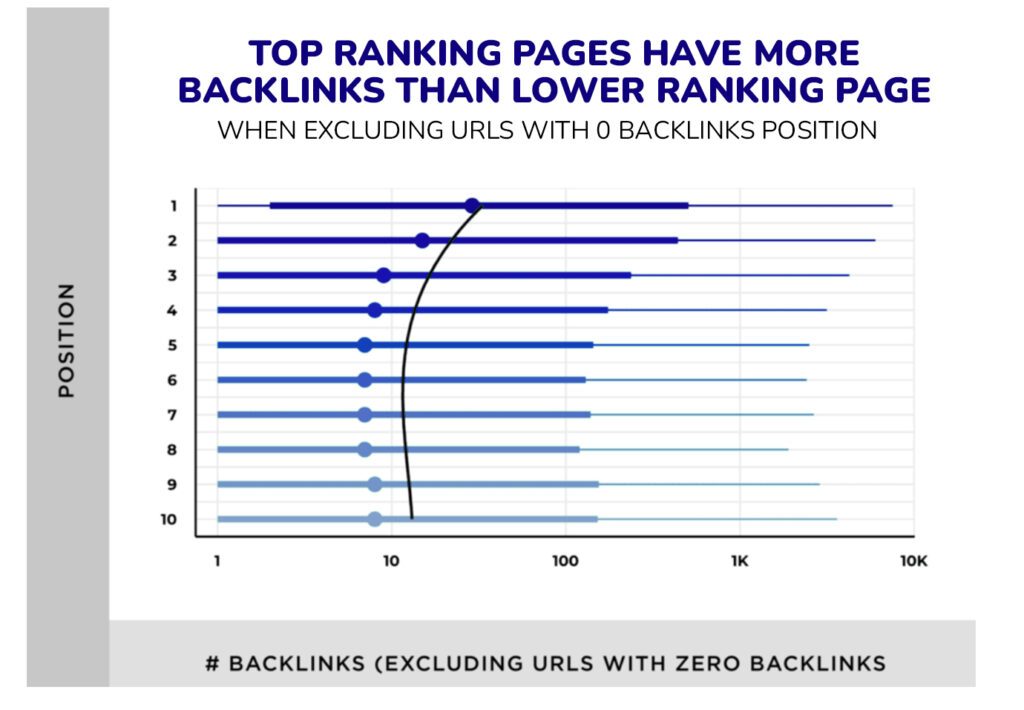
To shorten the time between placement and measurable SEO impact, it is better to buy quality backlinks from relevant pages with traffic, clear topical fit and strong donor metrics instead of chasing volume alone.
How Long for Backlinks to Take Effect?
You already know you shouldn’t expect a single number when asking how long do backlinks take to work. Backlinks move through stages before they noticeably influence rankings. Each stage has its own timing, and skipping one means nothing happens.
Let’s walk through the real sequence.
1. Crawl and discovery (3–14 days)
The backlink must first be crawled by Google. Google calls this step URL discovery.
Until that happens, it does not exist from Google’s perspective. If the linking domain is active, receives traffic, and publishes content regularly, discovery can happen within a few days. On slower sites that are crawled infrequently, it may take two weeks or longer.
Can you speed things up? Absolutely. Do this by ensuring that the linking page:
- is internally linked
- is not buried deep in pagination
- has traffic signals
- is already indexed
2. Indexing and signal processing (1–3 weeks)
After discovery, Google has to process the link and associate it with your page, which can take from a few days to a couple of weeks.. This is not just a technical indexing step.
Google also evaluates criteria like:
- topical relevance
- anchor context
- link placement
- historical trust of the linking domain
Processing typically happens within one to three weeks after indexing, depending on crawl frequency and system re-evaluation cycles. You still may not see rankings move at this point, and that’s normal.
3. Initial ranking movement (3–8 weeks)
This is the moment you’ve been waiting for: the first measurable shifts usually appear at this point.
You might see:
- impressions increasing in Google Search Console
- keyword positions fluctuating upward
- a page moving from position 18 to 11
These are early signals that link equity is being factored into the ranking system.
This timeline is not exact, but link impact is rarely immediate. In a Moz experiment summarized by Smart Insights, Kristina Kledzik analyzed 76 links and found that on average, it takes around 10 weeks for a page to see 1 rank jump.
In low-competition niches, this stage can happen closer to week three. In competitive SaaS, finance, or gambling verticals, it may take closer to week eight.
4. Noticeable traffic growth (2–4 months)
Further down the road, backlinks begin to show visible business impact.
You will see:
- the page(s) entering the top 10 results
- organic clicks rising
- secondary keywords starting to rank
Once again, the reason this takes longer is that rankings are relative. Your competitors are not static, and Google needs enough accumulated signal to justify pushing your page ahead of established results.
And remember that for brand-new websites, the timeline stretches significantly and can take six to twelve months before backlinks produce stable, noticeable ranking and traffic growth.
Here’s a quick rundown of the main timelines:
| Scenario | First signals (impressions & minor movement) | Noticeable impact (Traffic, stable ranking gains) | Why the timeline makes sense |
| Brand-new website (0–6 months old) | 4–8 weeks | 6–12+ months | No historical trust. Google needs sustained signals before assigning weight to links. |
| Existing website (steady history) | 2–4 weeks | 2–4 months | Baseline authority already exists, so new links compound faster. |
| Large authority domain | 1–3 weeks | 1–3 months | High crawl frequency + established trust accelerates processing and impact. |
| Page already ranking (positions 8–20) | 2–3 weeks | 6–10 weeks | Easier to push an existing page upward than to establish a new one. |
| Highly competitive niche (SaaS, finance, iGaming, etc.) | 4–6 weeks | 4–12 months | Competitors are actively building links. Movement requires sustained volume and quality. |
| Low-competition niche | 2–4 weeks | 1–3 months | Fewer authority signals required to outperform existing results. |
| Strong editorial backlink from a high-traffic site | 2–3 weeks | 6–12 weeks | Faster crawl + strong contextual authority accelerates effect. |
| Low-quality or low-relevance backlink | 3–6 weeks | Minimal or no visible impact | Weak topical signals; may pass little to no ranking value. |
What to Do If Backlinks Don’t Work After 4–8 Weeks
If 4–8 weeks have passed and your rankings have not moved at all, don’t rush to declare the backlinks useless. At this stage, you need to diagnose whether the problem is with the link, the target page, the keyword, or the competitive environment.
Backlinks rarely underperform for one single reason. More often, they fail because:
- The page is not strong enough
- The link is not relevant enough
- The keyword requires more authority than one or two placements can provide
Follow this diagnostic checklist:
| What to check | Why you should care | What to do |
| The linking page is not indexed | If Google has not indexed the placement page, the backlink cannot pass measurable value. | Check the placement URL in Google Search. If it is not indexed, improve internal linking to the page or avoid similar donors in the future. |
| The link is buried too deep | Links on orphaned pages, deep archive pages, or weak guest post sections may be crawled slowly and carry less weight. | Prioritize pages that are internally linked, visible in the site structure, and connected to relevant content. |
| The referring domain is topically weak | A backlink from an unrelated site may look good by metrics but send a weak relevance signal. | Compare the domain’s ranking topics with your target page topic. If there is no topical overlap, choose more relevant placements. |
| The anchor context is too generic | A link surrounded by vague or unrelated text gives Google less context about why your page is being referenced. | Place links inside paragraphs that clearly support the target topic, not in random mentions or generic author bio sections. |
| The target page is not competitive enough | Backlinks can support a page, but they cannot fully compensate for thin content, poor intent match, or weak on-page SEO. | Recheck search intent, content depth, internal links, title/H1, and whether the page actually deserves to outrank current results. |
| The keyword is too competitive | In competitive niches, a few links may not be enough to move the page, especially if competitors have stronger domains and better content. | Compare your page against the top 10 results by link profile, content quality, topical authority, and internal support. |
| Your link velocity looks unnatural | A sudden spike in low-quality or unrelated links can delay trust instead of improving rankings. | Build links gradually and diversify donors, anchors, and target pages. Avoid repeating the same placement pattern too aggressively. |
| You are tracking the wrong signals | Rankings may stay flat while impressions, secondary keywords, or crawl activity improve first. | Check Google Search Console for impressions, new queries, average position changes, and indexed pages before judging the campaign. |
If there is no movement after 4–8 weeks, look for early signals before making conclusions. Check whether:
- Impressions are growing
- The target page is ranking for more long-tail keywords
- Google has crawled the referring domain
- Your page is moving even slightly within the top 20–50 results
“If there are small positive signals, the backlinks may simply need more time and additional support. If there are no signals at all, the issue is usually deeper, including weak placement quality, poor topical relevance, no indexation, or a target page that is not ready to rank.”
–Sergei Pankov, CEO at Serpzilla
How to Check Whether a Backlink Counts
As you can see, a link can be published and still produce no measurable SEO effect if the page is not indexed, blocked from crawling, or buried too deep inside the site.
Check these factors to make sure it’s found and counted:
| What to check | How to check it | Insight |
| The donor page is indexed | Search Google for site:donordomain.com/page-url or paste the exact URL into Google Search. | If the page does not appear, Google may not be able to count the link yet. |
| The page is crawlable | Check whether the page is blocked in robots.txt, has a noindex tag, or uses a canonical tag pointing to another URL. | If Google is told not to crawl or index the page, the backlink may have little or no SEO value. |
| The link is not closed technically | Inspect the link HTML or use a browser extension to see whether the link has rel=”nofollow”, sponsored, or ugc”. | These attributes do not always make a link useless, but they change how Google may treat the link signal. |
| The page is not buried too deep | Start from the homepage or main category and count how many clicks it takes to reach the donor page. | If the page is 5–6 clicks deep or only accessible through archives, Google may crawl it less often. |
| The page has internal links | Check whether the donor page is linked from category pages, related articles, recent posts, breadcrumbs, or topic hubs. | Internal links help search engines discover the page and understand its importance inside the site. |
| The page is not orphaned | Use an SEO crawler or ask the publisher where the page is linked from. | An orphan page may be indexed once but receive little crawl attention or internal authority. |
| The page loads normally | Open the page in an incognito window and check whether the content and link are visible without login, scripts, or geo-blocking issues. | If Googlebot cannot access the content easily, the backlink may not be processed properly. |
For a fast manual check, use this sequence:
- Search the exact donor URL in Google.
- Open the page and make sure your link is visible in the main content.
- Check whether the link is marked as nofollow, sponsored, or ugc.
- Look for internal links pointing to the donor page.
- Check whether similar pages from the same section are indexed and ranking.
If the page is indexed, internally linked, crawlable, and part of an active section of the site, the backlink has a much better chance of being discovered and evaluated quickly.
When Waiting for Backlinks No Longer Makes Sense
Waiting is reasonable only while there are early positive signals.
- After 4–8 weeks, check whether the placement page is indexed, the link is crawlable, and your target page has gained impressions, new queries, or small ranking fluctuations.
- After 2–4 months, relevant indexed backlinks should usually produce at least some measurable movement. You should see changes in impressions, keyword coverage, average position, or long-tail rankings.
- If 4–6 months pass with no crawl, indexation, impression, ranking, or traffic signals, waiting longer is unlikely to solve the problem. At that point, audit the placement quality, link relevance, anchor context, internal links, target page quality, and keyword difficulty.
How to Measure and Track Your Results in 2026
Backlink impact unfolds across multiple layers: visibility, ranking stability, traffic, and revenue. True tracking link effectiveness means looking at signal progression with consistency. Let’s see how it’s done:
Early signals: Impressions and average position movement
Before traffic grows, visibility increases. Watch it to see the trends.
Go to Google Search Console → Performance → Search results and filter by the specific page you’re building links to.
Track:
- Impressions trend (week over week)
- Average position changes
- Number of ranking queries
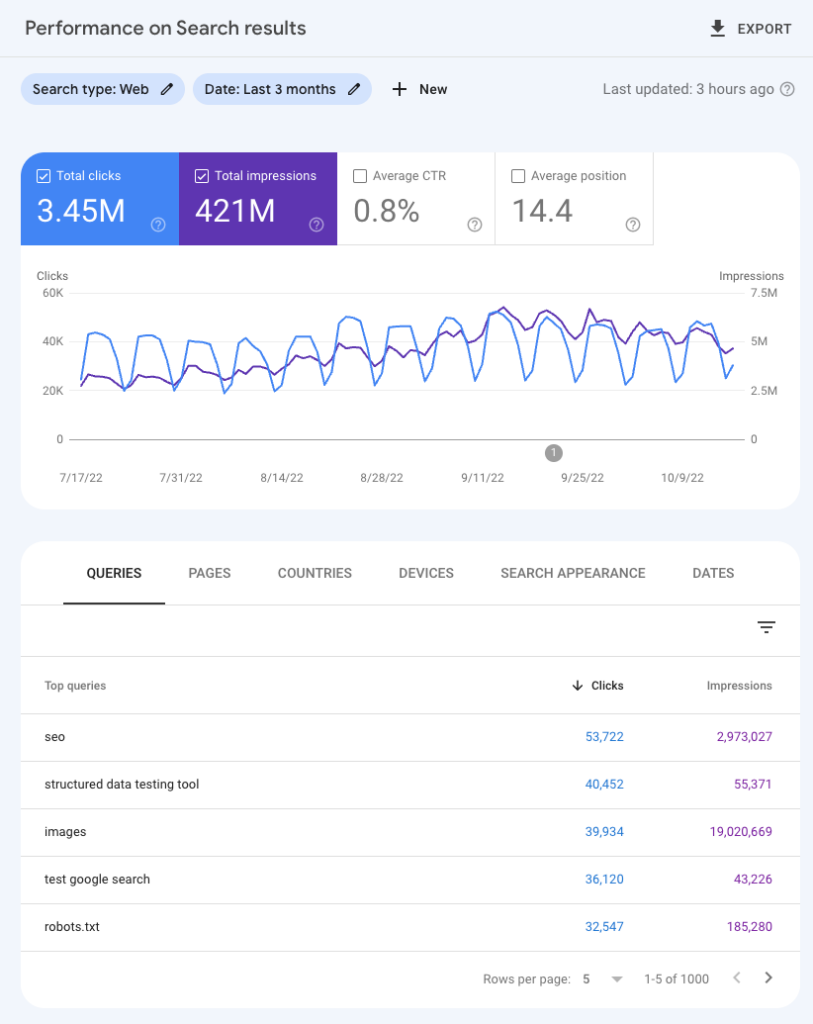
If backlinks are being processed, you’ll usually see impressions climb first. Rankings may fluctuate up and down before stabilizing. That fluctuation is normal and means Google is re-testing your page.
Pro tip: What you are looking for is not a sudden jump. You’ll want to see a consistent upward trend over 4–8 weeks.
Ranking stability
Use Ahrefs Rank Tracker, Semrush Position Tracking, or AccuRanker to measure whether SEO ranking gains hold over time.
Specifically, track:
- Position distribution changes (how many keywords move into top 20 or top 10)
- Stability over 3–4 weeks (do rankings hold or drop back?)
- Cluster movement (do related keywords rise together?)
Do not obsess over a keyword briefly jumping from position 14 to 9 — that might be a blip. A jump like this means nothing if it drops back a week later. Backlinks are working when rankings improve and stay improved across multiple related queries.
Organic traffic growth at the page level
Isolate the exact URL you’re building links to and check whether it is attracting more organic visitors over time. To do this, use Google Analytics 4 and go to Reports → Acquisition → Traffic acquisition. Then filter by:
- Session source: Google / organic
- Landing page
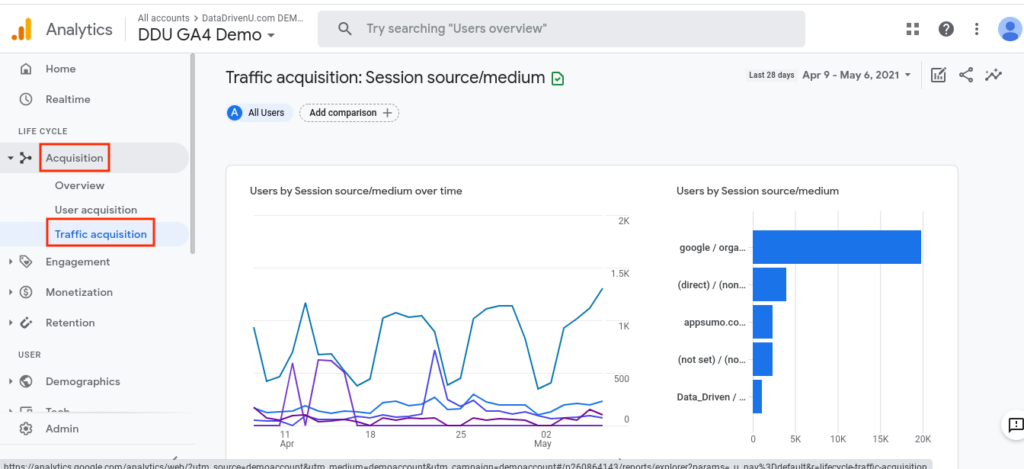
Look for:
- 20–30% sustained growth over 8–12 weeks
- Growth in non-branded queries
- Longer average engagement time
Keyword expansion and long-tail growth
One of the clearest signs that backlinks are working is keyword expansion.
Google’s Search Console comes in handy here again. Just check the Queries tab and compare:
- 28-day period before link acquisition
- 28-day period after 8–10 weeks
If backlinks are strengthening your page, you will rank for more variations and longer-tail phrases, even if you did not target them directly. This often happens before major head-term jumps.
Domain-level authority trends
Metrics like DR (Ahrefs) or Authority Score (Semrush) are not ranking factors but great context metrics nonetheless. They are comparative strength indicators.
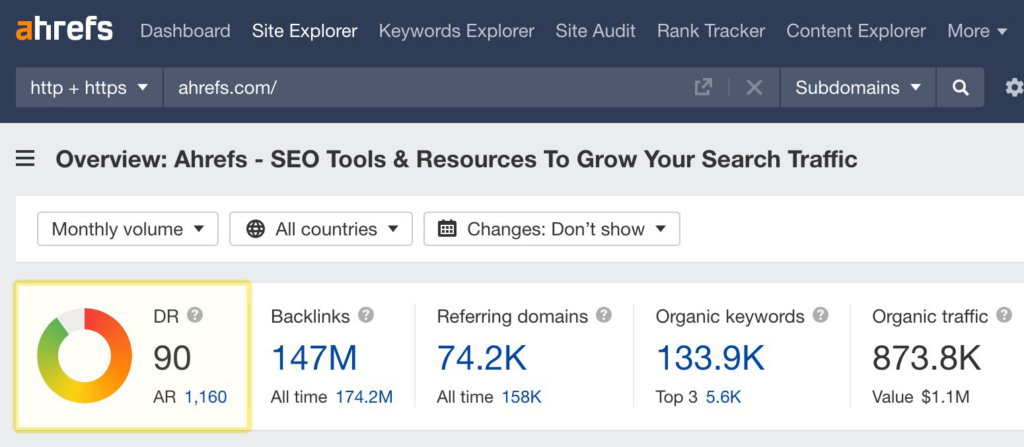
Track them monthly and pay attention to:
- steady upward DR trends
- improved referring domain count
- healthy anchor distribution
That indicates long-term compounding.
Balancing Backlink Impact and ROI: Key Strategies for Budgeting
Backlinks cost money, time, or both. The goal is to build links that generate measurable ranking movement without burning budget on noise. Smart budgeting means understanding which links move positions, how fast they do it, and when to reallocate spend. Approach it systematically with these tips:
Prioritize quality over volume
Budget should go toward links that combine:
- Topical relevance
- Real organic traffic
- Contextual editorial placement
High-traffic, relevant links tend to move rankings faster and compound authority over time.
Example:
You spend $1,500 on five contextual placements on niche-relevant blogs that each receive 10,000+ monthly organic visits. Within 10 weeks, your target page moves from position 14 to 7 and traffic increases by 35%.
Alternatively, you spend the same $1,500 on 40 low-traffic directory links. Rankings do not change after 12 weeks. The second option is cheaper per link, but far more expensive in lost opportunity.
Budget by page priority
Do not distribute link spend evenly across your site, that’s domain ego. Focus on pages where movement is realistic and revenue impact is measurable.
Prioritize:
- Pages ranking in positions 8–20
- High-intent commercial URLs
- Pages already generating impressions
Example:
Your SaaS pricing page ranks at position 12 for a high-converting keyword. Instead of building links to your homepage for brand prestige, you invest in 6 strong contextual links pointing directly to the pricing page. Within 8 weeks, the page moves to position 6, doubling organic demo requests.
Reallocate based on measurable impact
After 8–12 weeks, evaluate:
- Impression growth
- Ranking distribution shifts
- Page-level traffic trends
If a link type consistently correlates with ranking improvements, scale it. If it produces indexing but no movement, reduce spend. It’s simple but effective.
What Types of Backlinks Deliver the Best Results?
Not all backlinks influence rankings at the same speed or cost-efficiency. The right mix depends on competition level, budget, and page priority. Let’s take a closer look at the possible options:
| Link type | What it delivers | Budget level | Typical results |
| Editorial (in-content) | Strong authority + topical relevance | High | 4–12 weeks |
| Guest Posts | Controlled anchor + contextual placement | Medium | 6–10 weeks |
| Niche Edits | Faster indexing (existing pages) | Medium | 3–8 weeks |
| Directories & Citations | Trust baseline, local signals | Low | Minimal ranking lift |
| Forums / UGC | Traffic + diversification | Low | Unpredictable impact |
Editorial links tend to move rankings fastest in competitive niches because they combine authority and context. Niche edits often show quicker signals since they’re placed on already-indexed pages. Directories help build a foundation but rarely drive noticeable ranking growth on their own.
To build this healthy mix of formats, you can use Serpzilla. This is a backlink marketplace that lets you filter placements by traffic, niche relevance, DR, geography, and anchor type, all of which directly influence how long backlinks take to work. You can balance higher-impact editorial links with scalable niche edits while controlling link velocity to avoid unnatural spikes.
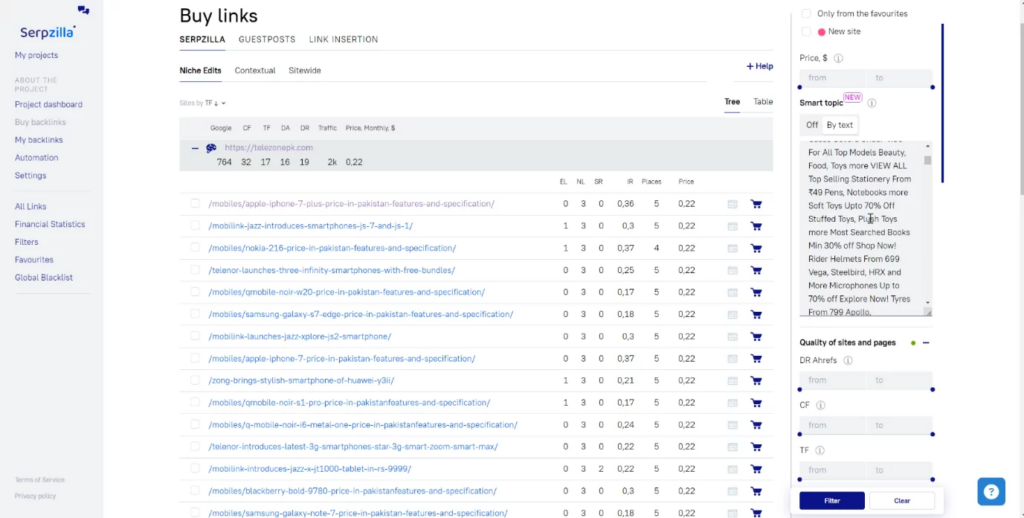
When you control those variables, timelines are more predictable, and ROI becomes measurable.
Conclusion
The time it takes for backlinks to start influencing SEO can vary from a few weeks to several months, depending on numerous factors such as the quality and source of the links, indexing frequency, and the level of competition in your niche. It’s important to keep building quality links and simultaneously work on all aspects of your SEO strategy to achieve the best results.